 |
FAQ | Feed-back | Forum | Survey | Terms | Donate | About us |
|
FAQ | Feed-back | Forum | Survey | Terms | Donate | About us |
| Home | Demo | Download | Register | Purchase | Documentation |
Chemoventory can send automatic email to each owner, if
the chemical expired or will expire in 7days. And also, if you set threshold
amount then you will receive automatic emails in the case if the amount falls below
the threshold. To use this future each owner should have email. To automate scheduler/Unix Cron job is
suggested.
Steps:
Notes:
This kind of scheduler is recommended, if you have more than 25 users or, if you consider alert emails are important for your activity.
What will happen, if the scheduler fails? If scheduler fails on any day, if the alert emails weren’t sent yet, then whenever first users logins then alert email wakeup and sends email.
Default
setup:
On each day during first logon of any user, the system will send and alert emails to each owners, if they have chemicals less than threshold or will expire in 7 days.
To automate the alert email system, we recommend having cron job (for Unix systems) or scheduler (for windows) to handle this job. The script to run is supplied as chemoventory/test/chemoventory_script.bat file in the distribution.
Place the chemoventory_script.bat file in some safe location (eg c:/scripts/chemoventory_script.bat)
You may need to edit the batch file, which has location of php executable file and the location of dailyjob.php
@c:\php\php.exe
c:/web_sites/chemoventorys/chemoventory/dailyjob.php
Batch files simple calls php and ask to execute one of the web page called dailyjob.php
dailyjob.php checks for all owners for the expired chemicals or for chemicals to be ordered.
In the absence of this scheduler/cron first login checks for this job
With this you can set for Unix cron job using crontab –e or any GUI utility
For cron job run something like
01 05 * * * /home/chemoventory/www/dailyjob.php
The best time to run this job would be anytime between 1AM and 7AM. The example shows it runs everyday 5:01 AM.
Please remember whenever you change the windows user name password, you should reset scheduler job with new password.
Window start à control panel à Scheduler job
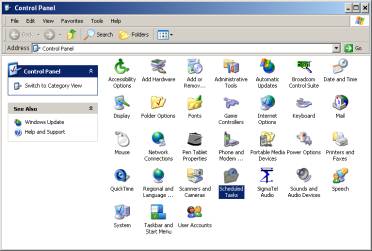
Set the job to run for every day morning 5AM.
You may exclude weekends, if you wish.
The following additional features may be worth to make a note of it.
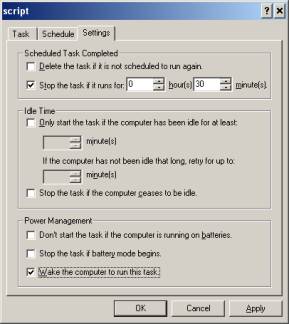
Stop the job, if it runs beyond 30 min. (Normally it will take less than a minute to run).
Also wakeup function is useful.